Kubernetes
If you already have a Kubernetes-based dev environment you are in the right place. For this doc, we'll assume that your dev environment is running on a Kubernetes cluster. These instructions should be relevant for dev environments where the database is running in the cluster or external to the cluster.
Current dev environment
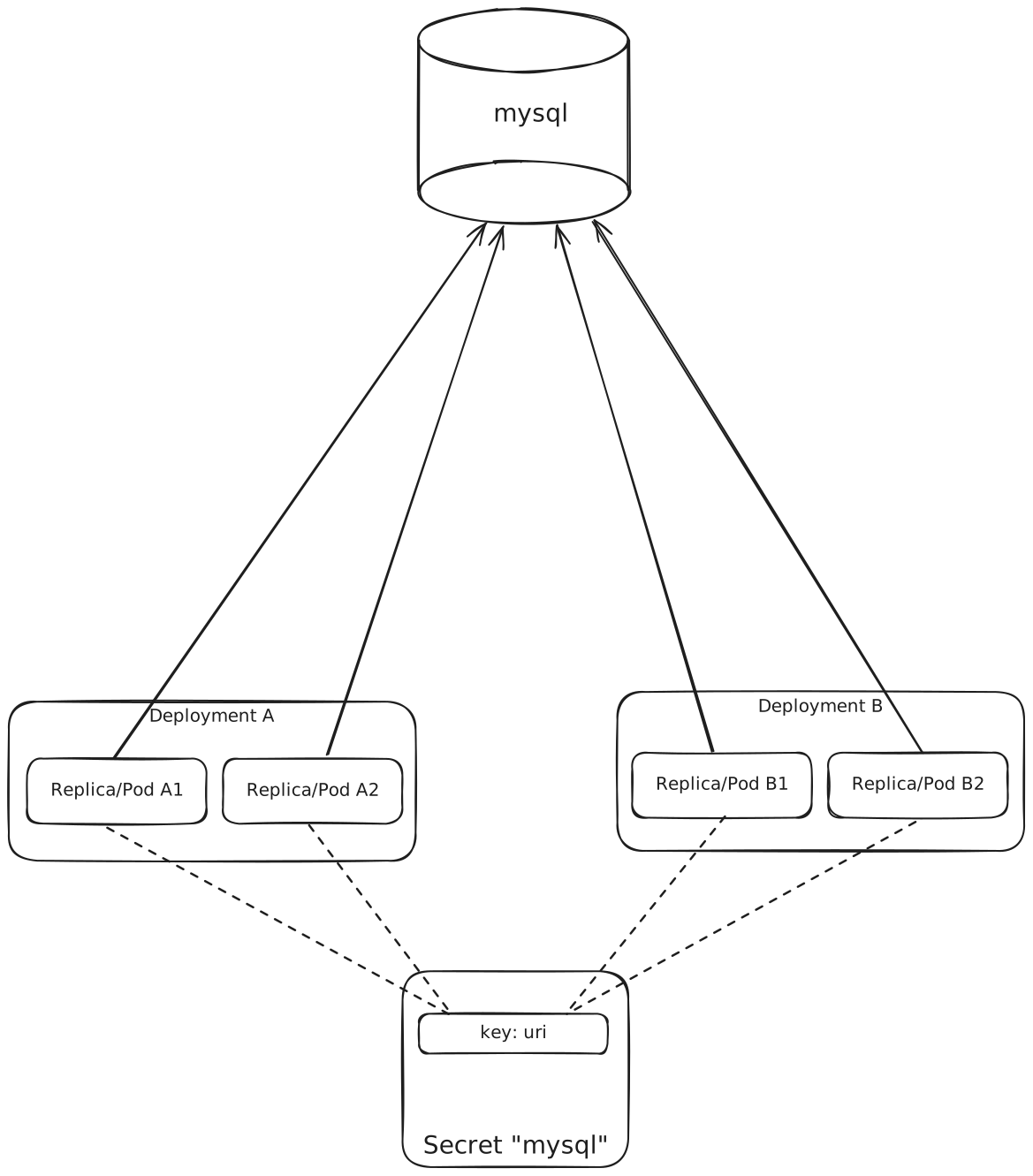
For this set up, we will assume that our application consists of multiple Deployments and StatefulSets that are connecting to your database. There's a single secret that contains the database connection string.
In our example environment, we have a secret named mysql that contains the connection string to our database in a key named url.
This value is mounted into all of our Deployments and StatefulSets.
The mysql server is running in the cluster, on a ClusterIP service named mysql, listening on port 3306.
The plaintext value of this key is:
mysql://root:password@mysql:3306/mysql?sslmode=disableHere's a basic diagram of our dev environment:
Updated dev environment
Our plan to integrate QueryPlan into this dev environment is to deploy the proxy, and then update the uri in the secret to point to the QueryPlan proxy.
Deploy the QueryPlan proxy
You can use our Helm chart to deploy the QueryPlan proxy to your cluster.
helm install oci://oci.queryplan.ai/queryplan-proxy --version 0.0.1Update the secret
Restart the pods
Once we've updated the secret, we need to roll the pods to pick up the new value.